 How-to
How Do You Clean Golf Cart Battery Terminals?
Last Updated: November 21, 2026
Quick Summary
Clean golf cart battery terminals by disconnecting the negative cable first, then spraying a mix of two tablespoons baking soda per cup of warm water on the battery terminals and letting it fizz for one to two minutes. Scrub with a terminal brush, rinse with plain water, dry completely, then reconnect positive first.
- Baking soda neutralizes acid on contact and fizzes where corrosion hides.
- Always remove the negative cable first and reconnect positive first.
- Rinse and dry fully because baking soda residue attracts moisture.
- Use 99% isopropyl alcohol for a final wipe and on AGM or lithium packs.
- Check terminal tightness monthly and apply terminal protection spray after cleaning.
Table of Contents
- Why Do Golf Cart Battery Terminals Corrode?
- Tools, Materials, and Safety Gear You Need Before You Start
- Electrical Safety: What to Do Before You Touch a Terminal
- How to Clean Golf Cart Battery Terminals With Baking Soda
- The Best Way to Clean Golf Cart Battery Terminals: Baking Soda vs. Alcohol vs. Commercial Cleaner
- Golf Cart Battery Corrosion Prevention That Actually Works
- When to Stop Cleaning and Book Professional Service
- Frequently Asked Questions
Why Do Golf Cart Battery Terminals Corrode?
Corrosion on golf cart battery terminals is the crusty white, blue, or green powder that forms when acid vapor escapes a lead-acid battery and reacts with the metal post. Left alone, that buildup blocks current flow and can leave you stranded mid-round.
The process is simple. Lead-acid batteries vent hydrogen gas and acid mist as they charge. Those vapors settle on the terminals, eat into the lead posts, and form a salt layer that resists electricity.
Here's what most guides get wrong: they treat corrosion as a cleaning problem. It's really a connection problem. A dirty terminal adds resistance, and resistance means weak starts, slow charging, and heat.
How Battery Chemistry Drives Corrosion
Lead-acid batteries use sulfuric acid and lead plates. During charging, the battery releases gas. That gas carries tiny acid particles upward.
When those particles hit the terminal, they react with the lead and the copper lug on your cable. The result is lead sulfate and copper sulfate, which is why you see white and bluish-green powder.
Overcharging speeds this up. So does a loose connection, which creates arcing and heat. A wet battery top makes it worse because moisture holds the acid in place.
Flooded batteries corrode more often than sealed AGM types. If you own a flooded cart, plan on checking terminals more often.
Tools, Materials, and Safety Gear You Need Before You Start
Gather everything first. Stopping mid-clean to hunt for a brush means acid sits on your skin longer than it should.
Here is a practical list of supplies to gather:
- Nitrile or rubber protective gloves
- Safety glasses or a face shield
- Baking soda (plain, not scented)
- Warm water
- A plastic spray bottle
- A terminal brush or stiff wire brush
- Isopropyl alcohol (99% preferred)
- Commercial terminal cleaner and terminal protection spray
- Clean rags, a bucket, and a wrench for the cable connectors
- A small battery cleaner brush for tight spots
Skip the metal bucket. Skip power washing entirely. And never bring a shop rag soaked in gasoline anywhere near the battery compartment.
Electrical Safety: What to Do Before You Touch a Terminal
Most guides treat safety as a bullet list. A complete protocol is ordered, and the order matters. Work through these steps every time, even for a quick terminal wipe-down.
Step 1: Shut the cart down completely. Turn the key off, put the direction selector in neutral, set the parking brake, and remove the key. If your cart has a run/tow switch, flip it to tow.
Step 2: Remove metal from your body. Rings, watches, bracelets, and necklaces are conductors.
Step 3: Disconnect in the right order. Always remove the negative cable first, then the positive. Reconnect positive first, then negative.
Step 4: Control sparks and flames. Lead-acid batteries vent hydrogen gas while charging, and a hydrogen-air mix is explosive at surprisingly low concentrations.
Step 5: Protect against acid exposure. Wear nitrile gloves and safety glasses, not just for the scrub step but for the disconnect step. Acid mist settles on the battery tops and on the cable lugs.
Step 6: Work ventilated and stable. Open the garage door or work outside. Do not stand on a metal stool or lean across the pack.
Watch out: a wrench dropped across two posts creates a dead short. The wrench can glow red in seconds, the battery can crack, and the acid can spray. Keep tools in a tray, not on the battery tops.
The Occupational Safety and Health Administration electrical safety guidance treats battery work as energized work, and that framing is correct: even a pack that will not move the cart can deliver enough current to weld metal.
How to Clean Golf Cart Battery Terminals With Baking Soda
The best way to clean golf cart battery terminals with baking soda is a simple five-step process: disconnect, mix, scrub, rinse, and dry. Baking soda neutralizes acid on contact, which makes it a common first choice for light to moderate corrosion.
Mix about two tablespoons of baking soda into a cup of warm water. Pour it into a plastic spray bottle. You want a thin paste or a sprayable solution, not a thick slurry.
Spray the terminals and let it sit for a minute. The solution will fizz where acid is present. That fizzing tells you exactly where the corrosion is hiding.
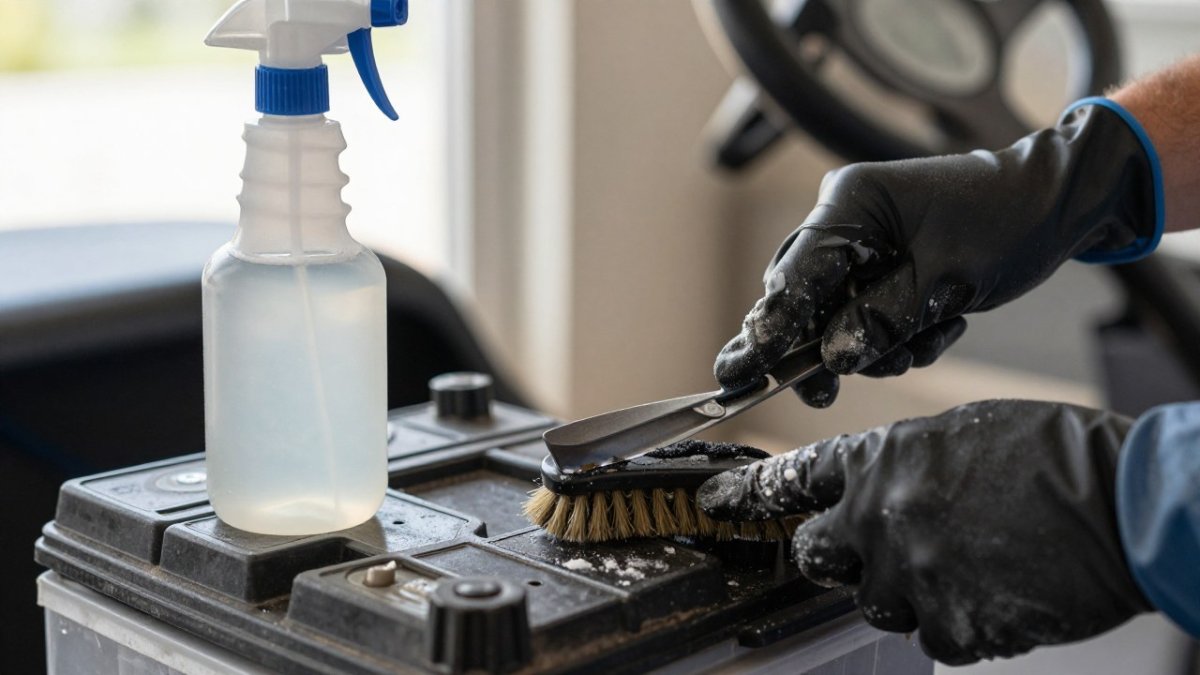
Step-by-Step: Disconnect, Mix, Scrub, Rinse, Dry
- Disconnect the negative cable, then the positive. Move cables clear of the posts.
- Mix the baking soda solution in your spray bottle.
- Spray the terminals, posts, and cable connectors. Let it fizz for one to two minutes.
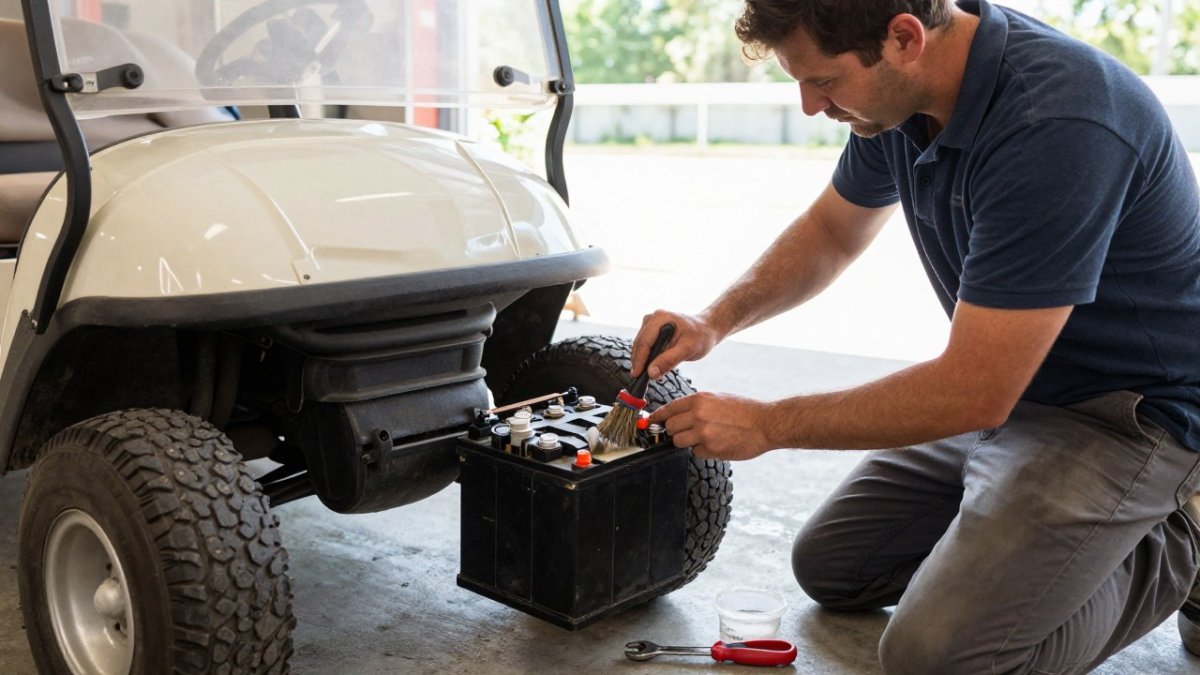
- Scrub with a terminal brush or wire brush until the metal shines. Work the brush into the cable lugs too.
- Rinse with plain water from a spray bottle or a damp rag. Do not flood the battery top.
- Dry everything completely with a clean rag. Moisture invites corrosion back.
- Reconnect the positive cable first, then negative, and tighten snugly.
A common mistake is skipping the dry step. Trapped moisture under a cable lug starts the whole cycle again within weeks.
The Best Way to Clean Golf Cart Battery Terminals: Baking Soda vs. Alcohol vs. Commercial Cleaner
The right method depends on three things: how heavy the corrosion is, what kind of battery you have, and whether you are cleaning or protecting. Most guides pick one method and skip the decision. Here is the decision guide.
Baking soda and warm water is the default for flooded lead-acid batteries with light to moderate white or green crust. Baking soda neutralizes acid on contact, which is why it fizzes where corrosion is hiding.
Isopropyl alcohol (99%) is the right choice for wiping down battery tops, cable lugs, and the plastic case, and for a final wipe after a baking soda rinse.
Commercial terminal cleaner is built for heavy, cracked crust and for the protective film many products leave behind. That film is the real value: it slows new buildup. Follow the label directions exactly, including dwell time and rinse requirements.
Water alone is the method most often argued about. A spray bottle of plain water is fine for rinsing a baking soda paste or wiping a dusty top.
Battery chemistry changes the advice. Flooded lead-acid batteries are the ones that vent acid mist and corrode terminals, so the baking soda method applies.
| Method | Best For | Battery Type | Watch Out For |
|---|---|---|---|
| Baking soda and warm water | Light to moderate acid corrosion | Flooded lead-acid | Must rinse and dry fully; residue attracts moisture |
| Isopropyl alcohol (99%) | Wiping tops, lugs, final wipe | All types, including AGM and lithium | Flammable; no neutralizer |
| Commercial terminal cleaner | Heavy crust, preventive coating | Flooded lead-acid and AGM | Follow label; some are acid-based |
| Plain water (spray bottle) | Rinsing baking soda, light dust | Flooded lead-acid | Do not flood the top or power-wash |
A general rule of thumb: baking soda first for flooded packs, alcohol for the final wipe-down and for AGM or lithium, commercial cleaner when the crust is thick enough to crack.
Golf Cart Battery Corrosion Prevention That Actually Works
Prevention comes down to three habits: keep the terminals tight, keep the top dry, and check often. Corrosion often comes from loose cables and overcharging rather than from bad batteries.
Start with a simple routine:
- Check terminal tightness monthly. A loose lug arcs and heats up.
- Keep the battery tops and sides dry. Wipe up spills and rinse water.
- Apply terminal protection spray or a thin coat of dielectric grease after cleaning.
- Verify your charger. A charger that overcharges will keep cooking the terminals.
- Top up flooded batteries with distilled water to the correct level, never above it.
- Clean thoroughly on a schedule based on how fast buildup returns.
If you want a broader routine, our golf cart maintenance checklist covers the full yearly schedule.
Post-Cleaning Inspection and Recurring Corrosion Diagnosis
After cleaning, inspect the terminals for pitting, cracks, or a swollen battery case. Any of those means the battery is failing, not just dirty. If corrosion returns within a few weeks, the cause is usually a loose connection, an overcharging charger, or an old battery.
Check the cable lugs for green powder inside the crimp. That means acid has wicked into the wire and the cable needs replacing.
If you are unsure whether the pack is simply at the end of its life, our guide on how old your golf cart batteries are walks through the age and voltage checks.
When to Stop Cleaning and Book Professional Service
Stop cleaning and book service when you see cracked cases, swollen batteries, melted posts, or corrosion that returns within days. Those point to a failing battery or a charging fault, and no amount of scrubbing fixes either one.
Also stop if a terminal feels hot after charging, if you smell rotten eggs, or if the cart loses power under load. Heat and sulfur smell mean a battery is failing internally.
Before you decide, it helps to know what replacement runs. Our golf cart battery replacement cost breakdown lays out the numbers.
If you would rather hand it off, our professional golf cart diagnostics service covers what a full inspection includes. And if you are weighing DIY against paying a pro, our golf cart maintenance costs breakdown gives you the full picture.
Amplify Your Ride is a golf cart dealership offering new and used golf cart sales, service, rentals, and parts. For current pricing or service availability, contact the dealership directly through its website.
Corroded terminals are a small problem that turns into a tow bill. Clean them right, protect them after, and check them monthly. When the corrosion keeps coming back, let Amplify Your Ride test the pack, inspect the cables, and check your charger before a cheap fix becomes an expensive one. Our service department handles diagnostics, battery replacement, and parts for new and used carts, and we stock what your cart needs.
Frequently Asked Questions
What is the best thing to clean battery terminals with?
A baking soda and warm water paste works for most light to moderate corrosion on lead-acid golf cart batteries because it neutralizes the acid residue. For heavier buildup, a commercial terminal cleaner or 99% isopropyl alcohol can finish the job. Whichever you use, disconnect the cables first, wear safety glasses and protective gloves, scrub with a wire brush or terminal brush, then rinse and dry thoroughly before reconnecting.
Can you clean golf cart battery terminals without disconnecting them?
You can wipe light corrosion off the battery tops without disconnecting, but a full terminal cleaning should include disconnecting the cables. Disconnecting in the correct order (negative first) prevents shorts and sparks, and it lets you clean the cable connectors and battery posts properly. If corrosion has reached the cable ends, cleaning without disconnecting leaves the worst of it in place.
How can you prevent golf cart battery corrosion from coming back?
Rinse and dry the battery tops after every cleaning, keep the battery water at the correct level, and apply a terminal protection spray or dielectric grease to the posts and connectors. Check terminals monthly during riding season. If corrosion returns within weeks, that points to overwatering, a cracked case, or a charging issue, and it is worth having the battery compartment inspected.
Can I use WD-40 or Coca-Cola to clean golf cart battery terminals?
Neither is a cleaner. Coca-Cola contains sugar and acid that leave a sticky residue on battery tops, and standard WD-40 is a lubricant, not a neutralizer, so it does not remove corrosion residue. Baking soda solution, 99% isopropyl alcohol, or a commercial battery cleaner do the actual cleaning. Save the WD-40 for loosening rusted hardware, and use a proper terminal protector afterward.